Who scores? Who always turns up?
Stats and a leaderboard for your amateur team
Startelf keeps your amateur team's football stats automatically: appearances, goals, attendance and Player of the Match – per player and as a team leaderboard, all time or for a single year. No tally sheets, no spreadsheets.
- leaderboards – apps, goals, POTM
- 3
- tally sheets by hand
- 0
- or filter by year
- All time
Features at a glance
- Team leaderboard
- Appearances
- Goals
- Attendance rate
- Player of the Match
- Player of the Day
- Filter by year
- Logged automatically
Numbers that write themselves
You play.
Startelf keeps the stats.
Replies, line-ups and the live score turn into your team's player stats – without anyone typing anything in afterwards.
-
Team leaderboard
Tap the trophy in the squad view to open your team's leaderboard. Sort by appearances, goals or Player of the Match awards – the top three are highlighted in gold, silver and bronze.
The period filter lets you pick “All time” or a single calendar year. Every team member can see the leaderboard, and players without an appearance are listed with 0.
- Appearances, goals and POTM categories
- All time or per calendar year
- Ties are broken by the other categories
- Visible to everyone in the team
-
Appearances that add up
Every past event you accepted or were picked for counts as an appearance. For matches with a selected squad, only players who started or came on count – unused subs don't.
-
Goals from the live score
Whoever logs a goal during the match – in the app or on the Apple Watch – feeds the top-scorer list automatically. Own goals don't count for the scorer.
-
Player of the Match
After the final whistle, everyone who took part votes in secret for the best player – no voting for yourself, no guests. If an event had several matches, Startelf also crowns the Player of the Day.
The result arrives by push and as a winner's graphic in the team chat. Awards count in profiles and on the leaderboard.
- Secret ballot, vote can be changed until it closes
- Voting window adjustable per team
- Winner's graphic to share
-
Attendance & player profile
How often did someone turn up? Startelf sets acceptances against all of the team's past events – no reply counts as absent. The rate sits in the player profile alongside appearances, goals and POTM awards, broken down by year.
-
Only what actually happened
Cancelled and deleted events drop out of the stats; future ones only count once they're over. And when a guest becomes a regular, their goals come with them.
New in version 3.0
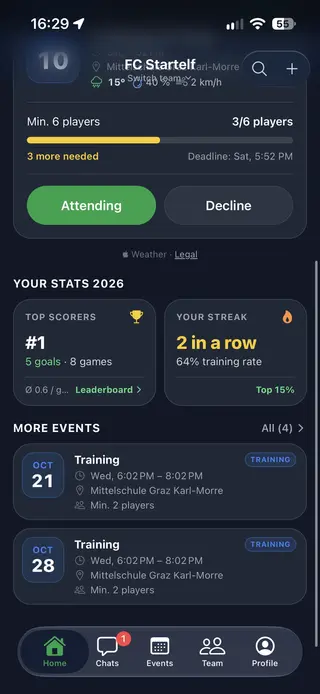
Your stats on the home screen
How’s your season going? Startelf shows you as soon as you open the app – for the current year.
- Top-scorer rank
-
Your rank in the team, goals, games and goals per game – one tap takes you to the full leaderboard.
- Your streak
-
RSVPs in a row and your training attendance – and where that puts you in the team.
- More events
-
Below, your next events at a glance – with place, time and minimum.
Three steps
From match day to leaderboard
-
Replies & line-up
Players accept via push, you pick the squad and starting eleven.
-
Log it live
Record goals and substitutions during the match – in the app or on the Apple Watch.
-
Vote & compare
Pick the Player of the Match, and it's all there in profiles and on the leaderboard.
Quick answers
FAQ on leaderboard & stats
What counts as an appearance?
Every past event you accepted or were in the line-up for – training, match or tournament. For matches with a selected squad, only players who started or came on count.
Where can I see my own stats?
Right on the home screen under “Your stats” – for the current year with your top-scorer rank, goals, goals per game, RSVPs in a row, training attendance and more. Your full history is in your player profile.
Where do the goals in the stats come from?
From the live score. Every goal assigned to a player during the match goes into their stats and onto the leaderboard. Own goals aren't counted.
How is the attendance rate calculated?
Accepted events divided by all of the team's past events. Not replying to an event counts as absent. Cancelled and deleted events are left out.
How does the Player of the Match vote work?
After the match, everyone who took part votes in secret – you can't vote for yourself and guests don't vote. The manager sets how long voting stays open (two hours by default). The result arrives by push and as a graphic in the team chat.
Can I filter the leaderboard by season?
Yes, by calendar year: choose “All time” or any year in which your team had events. You can sort by appearances, goals or Player of the Match awards.
Do cancelled events count in the stats?
No. Stats and leaderboard only include events that actually took place – cancelled and deleted ones drop out, upcoming ones only count once they're over.
How much does Startelf cost?
Startelf is free for players. Creating events and managing the team comes with the Manager subscription – one subscription for the whole team, from €4.99 a month or €49.99 a year, first month free, cancel anytime.
- Player Profiles
-
Position, strong foot, height and appearances at a glance.
- Fixtures & Line-ups
-
Recurring events, RSVPs, places with maps, weather and fair line-ups.
- Tournament Management
-
Fixtures, tables and live results for your tournament – spectators follow everything via a link.
Kick-off
Bin the tally sheet.
One subscription for the whole team – from €4.99 a month, free for players. 1-month free trial, cancel anytime. For iOS and Android.