Who's coming? Who's playing? Sorted.
Availability and line-ups in one app
Training, match or tournament: Startelf schedules your amateur football team's fixtures, collects availability via push and sets the line-up – from balanced training sides to your starting eleven on the tactics board. No more polls in the group chat.
- reply straight from the push
- 1 tap
- automatic reminders
- 2
- pitch sizes on the tactics board
- 2v2–11v11
Features at a glance
- Recurring events
- Reply via push
- Waiting list
- Absences
- Fair training sides
- Tactics board
- Live score
- Apple Watch
From fixture to kick-off
Plan fixtures.
Pick your side.
Everything coaches and team managers in amateur football need for training and match day – in one app for iOS and Android.
-
Events & recurring events
Create matches, training sessions, tournaments and other team events with venue, time and description. For matches you add the opponent and pitch size – from 5-a-side indoors to full size.
Training every Tuesday? Create it once as a recurring event – daily, weekly, every two weeks or monthly. Changes and cancellations apply to a single event or the whole series, your choice.
- Match, training, tournament or other
- Recurring events up to 13 months ahead
- Maximum number of players and minimum confirmations
- Cancel with a reason – everyone who replied is notified
- Upcoming, past and cancelled events, filterable by type
-
Reply via push
Everyone gets a push notification for new events – accept or decline right from the notification, without opening the app. Anyone who hasn't replied yet gets an automatic reminder.
-
A waiting list that runs itself
Event full? Further replies go on the waiting list. When someone drops out, the next player moves up automatically and gets a push.
-
Absences
On holiday or injured? Enter the period – events in it you haven't replied to are declined automatically. You can still accept individual events.
-
Fair training sides
Startelf splits everyone who accepted into balanced teams at the push of a button: one goalkeeper per team, defence, midfield and attack spread evenly. Not happy? Just reshuffle.
-
Live on Apple Watch
Track the match right on your wrist – with a running match clock, a goal at the press of a button and scorer selection via the Digital Crown.
-
Squad & tactics board
For a match you pick the squad – all accepted players in one tap if you like. On the tactics board you set your starting eleven in the right formation; everyone else goes on the bench.
Line-up ready? Publish it: starters and substitutes get a push notification. If anything changes, simply publish again.
- Formations for 1 to 10 outfield players plus goalkeeper
- Positions from goalkeeper to striker
- Plan the line-up days before the match
- Push to starters and bench when you publish
-
Live score & stats
Log goals, substitutions and cards live – the team sees the score in real time. Appearances, goals and attendance flow straight into player stats.
-
For parents & guests
Parents reply for their children, across several teams too. As a manager you enter guest players yourself – so the numbers add up on the pitch.
-
Places with maps
Find the pitch via map search – Apple Maps on iPhone, Google Maps on Android – with address, map preview and directions in one tap. Your team’s most-used pitches show up right at the top.
-
Weather at kick-off
Rain at training? Startelf shows the weather at kick-off – up to 7 days ahead, in the event list, the event itself and on the home screen.
-
Next event at a glance
The home screen shows your next event as a big card: with weather, RSVP progress and deadline – accept or decline right there.
A quick tour
From event to RSVP
Home screen, event list, event details: this is how you coordinate your team with Startelf.
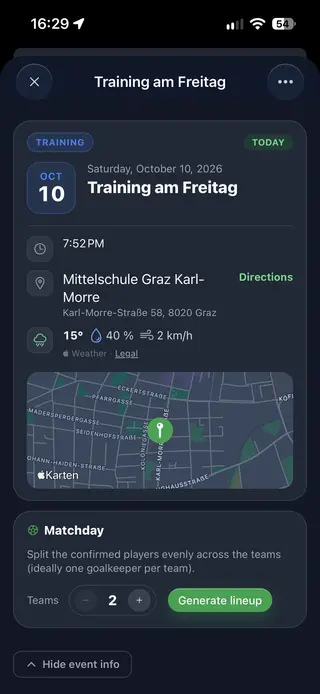
- Place, directions and weather
-
Every event shows the address, a map preview and the weather at kick-off – directions are one tap away.
- Accept or decline with one tap
-
On the home screen, in the event list or in the event – and the progress bar shows how many RSVPs are still missing.
- Fair teams for match day
-
Startelf splits the confirmed players evenly across several teams – ideally one goalkeeper per team.
Four steps
From fixture to line-up
-
Create the event
Match or training with venue and time – one-off or recurring.
-
Collect replies
Everyone gets a push and replies with one tap. Late repliers get a reminder.
-
Pick the side
Fair training sides at the push of a button, or squad and starting eleven on the tactics board.
-
Kick-off
Publish the line-up, log the score live – the stats fill themselves.
Quick answers
FAQ on fixtures & line-ups
Can players accept or decline straight from the push notification?
Yes. On iOS and Android the notification for a new event has accept and decline buttons – no need to open the app. The buttons work until your team's reply deadline.
What happens if more players accept than there are places?
You set a maximum number of players per event. Further replies go on the waiting list. When someone drops out, the next player moves up automatically and gets a push notification.
How does Startelf split teams for training?
Startelf spreads everyone who accepted across balanced teams based on their main and secondary position: one goalkeeper per team where possible, plus defence, midfield and attack evenly. Teams differ by at most one player. Not happy with the split? Reshuffle or move individual players.
Can I plan the line-up for a match in advance?
Yes. You put together the squad and starting eleven on the tactics board days before the match. Hit “Publish” and starters and substitutes get a push notification. If anything changes afterwards, simply publish again.
How do recurring events work?
An event can repeat daily, weekly, every two weeks or monthly – up to 13 months ahead. When editing, cancelling or deleting, you choose whether only this event or the whole series is affected.
Can parents reply for their children?
Yes. Parents create profiles for their children and handle replies and absences for them – across several teams too. Later, the child can take over the profile with an account of their own.
How much does Startelf cost?
Startelf is free for players. Creating events and managing the team comes with the Manager subscription – one subscription for the whole team, from €4.99 a month or €49.99 a year, first month is free, cancel anytime.
- Push Notifications
-
RSVP straight from the notification.
- Absences
-
Add holidays or injuries – events are declined automatically.
- Leaderboard & Stats
-
Goals, appearances and Player of the Match – counted automatically.
Kick-off
No more “Who's in on Saturday?”
One subscription for the whole team – from €4.99 a month, free for players. 1-month free trial, cancel anytime. For iOS and Android.